


Back pain is the most common reason people upgrade their office chair. If you are spending eight hours a day in a seat that does not support your spine properly, the consequences compound over months and years. You might experience tight hip flexors, compressed lumbar discs, weakened core muscles, and chronic discomfort that follows you home from work.
The right ergonomic chair will not cure existing back problems on its own, but it removes the cause of many issues and creates the conditions for recovery. Choosing the best ergonomic chair for back pain requires understanding how different chairs support your body. Here is what to look for when selecting your next office chair.
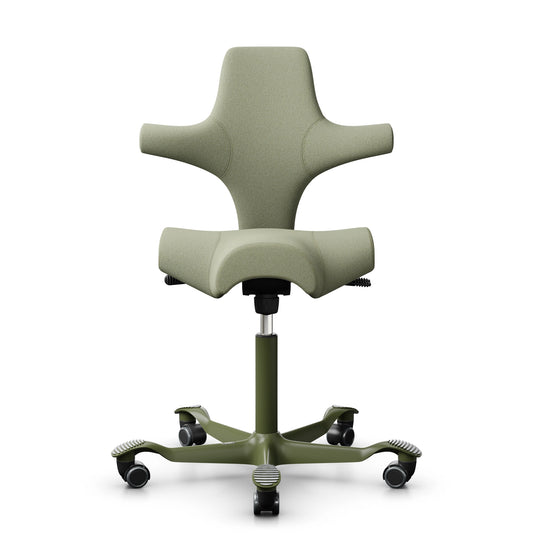
The HAG Capisco saddle seat opens the hip angle and reduces pressure on the lumbar spine
Understanding why sitting causes back pain
Sitting causes back pain because it alters the natural alignment of your spine. When you sit in a standard chair, your hip angle closes to roughly 90 degrees. This tilts your pelvis backward, flattening the natural lordotic curve of your lumbar spine. The muscles and ligaments that maintain this curve are stretched beyond their resting length, and the intervertebral discs bear more compressive load than they are designed for.
Over time, this poor posture leads to disc dehydration, facet joint irritation, and muscle fatigue. The solution is not simply sitting up straighter through willpower. It is choosing a chair that makes a healthy spinal position the path of least resistance. Active sitting is a great way to combat this, and you can learn more about it in our guide on what is active sitting.
Key features for back pain relief
When shopping for an ergonomic chair to relieve back pain, you need to look for specific features that support your spine and encourage movement. Here are the most important elements to consider.
Adjustable lumbar support
Your lower back needs support at the L3-L5 vertebrae to maintain its natural curve. The best chairs offer both height and depth adjustment for the lumbar pad, so you can position it precisely where your spine needs it most. The Herman Miller Aeron uses PostureFit SL, which supports both the lumbar and sacral regions independently. This targeted support helps maintain the natural S-curve of your spine.
Seat depth adjustment
Seat depth adjustment is crucial for proper leg support and back alignment. If the seat pan is too deep, it presses against the back of your knees and forces you to slouch forward away from the backrest. Look for at least 5cm of seat depth adjustment so the front edge sits two to three finger widths from the back of your knee. This ensures you can sit fully back in the chair while maintaining good circulation in your legs.
Open hip angle
Chairs that position your thighs at a slight downward angle, typically 100 to 120 degrees rather than 90 degrees, reduce disc pressure significantly. The HAG Capisco 8106 takes this principle furthest with its saddle seat, which opens the hip angle to approximately 135 degrees, similar to standing. This open angle naturally rotates the pelvis forward, restoring the lumbar curve without the need for aggressive back support.
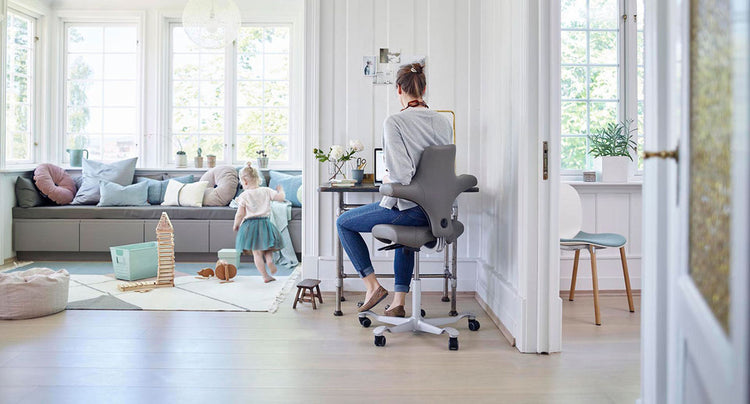
Pairing the Capisco with a sit-stand desk allows you to alternate between sitting and standing throughout the day
Dynamic movement
Static sitting, even in a perfectly adjusted chair, still causes problems over time. Chairs with a free-floating or balanced mechanism allow your body to move naturally while seated. This keeps muscles engaged, promotes disc nutrition through compression and decompression cycles, and prevents the stiffness that comes from holding one position too long. The ergonomics and movement philosophy emphasises the importance of changing postures frequently.
Comparing top ergonomic chairs for back pain
To help you make an informed decision, we have compared three of the best ergonomic chairs for back pain available in Australia. Each chair offers unique benefits depending on your specific needs and work style.
| Feature | HAG Capisco 8106 | Herman Miller Aeron | HAG SoFi |
|---|---|---|---|
| Best For | Active sitting, sit-stand desks | Traditional desk work, lower back support | All-day comfort, shared workspaces |
| Lumbar Support | Natural alignment via saddle seat | PostureFit SL (sacral and lumbar) | Adjustable padded lumbar support |
| Movement | High mobility, multiple sitting positions | Kinemat tilt mechanism | HAG in Balance mechanism |
| Seat Type | Saddle seat | 8Z Pellicle mesh | Padded foam seat |
Our recommendations for back pain
Choosing the right chair depends on your work environment and personal preferences. Here are our top recommendations based on different needs.
Best for active sitting and sit-stand desks
For severe or chronic back pain, the HAG Capisco combined with a sit-stand desk offers the most relief. The saddle seat fundamentally changes the biomechanics of sitting, and the ability to alternate between sitting and standing prevents any single posture from becoming problematic. If you are setting up a new workspace, check out our guide on how to choose a sit-stand desk.
Best for traditional desk work
For those who prefer a traditional chair feel, the Herman Miller Aeron provides exceptional lumbar support through its PostureFit SL system, while the 8Z Pellicle mesh distributes pressure evenly to eliminate hot spots. It is a classic choice for a reason, offering unparalleled support for long hours of focused work. You can explore more options in our Herman Miller collection.
Best for all-day comfort
The HAG SoFi is an excellent option for those who want the benefits of active sitting with the comfort of a traditional padded chair. It features the HAG in Balance mechanism, which ensures subconscious movement throughout the day, keeping your muscles engaged and your spine healthy.
How to set up your ergonomic workspace
A great chair is only part of the solution. To truly alleviate back pain, you need to ensure your entire workspace is ergonomically sound. This includes your desk height, monitor position, and keyboard placement.
First, adjust your chair so your feet are flat on the floor and your knees are at or slightly below hip level. If your desk is too high, use a footrest to maintain this posture. Next, position your monitor so the top of the screen is at or slightly below eye level. This prevents you from craning your neck forward, which can contribute to upper back and neck pain. Using a monitor arm, such as the CBS Flo Single Monitor Arm, allows you to easily adjust the height and depth of your screen for optimal viewing.
Finally, ensure your keyboard and mouse are positioned so your elbows rest comfortably at your sides, bent at roughly 90 degrees. This reduces strain on your shoulders and upper back.
Frequently Asked Questions
What is the best office chair for lower back pain?
The best office chair for lower back pain is one that provides targeted lumbar support and encourages movement. The Herman Miller Aeron with PostureFit SL is excellent for traditional sitting, while the HAG Capisco is ideal for active sitting and opening the hip angle to reduce spinal compression.
Are mesh chairs better for your back?
Mesh chairs are not inherently better for your back, but they do offer excellent breathability and even weight distribution. High-quality mesh, like the 8Z Pellicle used in the Herman Miller Aeron, provides varying zones of tension to support different parts of the body effectively.
How should I sit to avoid back pain at my desk?
To avoid back pain, sit with your feet flat on the floor, your hips slightly higher than your knees, and your lower back supported by the chair's lumbar pad. Avoid slouching forward or crossing your legs, and make sure to change your posture frequently throughout the day.
Is a saddle chair good for back pain?
Yes, a saddle chair like the HAG Capisco is excellent for back pain. It opens the hip angle to 135 degrees, which naturally rotates the pelvis forward and maintains the spine's natural curve without relying heavily on a backrest.
How often should I stand up if I have back pain?
You should aim to change your posture every 30 to 45 minutes. If you have a sit-stand desk, try alternating between sitting and standing throughout the day. Even brief periods of movement, like standing up to stretch or walking to get a glass of water, can significantly reduce back pain.
Do I need a headrest on my ergonomic chair?
A headrest is not strictly necessary for lower back pain, but it can be beneficial if you experience neck or upper back pain, or if you frequently recline in your chair. It provides support for the cervical spine during periods of rest or reclined working.
Upgrade your workspace today
Investing in a high-quality ergonomic chair is an investment in your health and productivity. Do not let back pain dictate your workday. Browse our full range of task chairs to find the perfect fit for your needs. If you need help choosing the right chair, feel free to contact us for expert advice.


